Payment Integration in Saudi Arabia: 4 Ways to Fit Your Business, From a Payment Link to an API
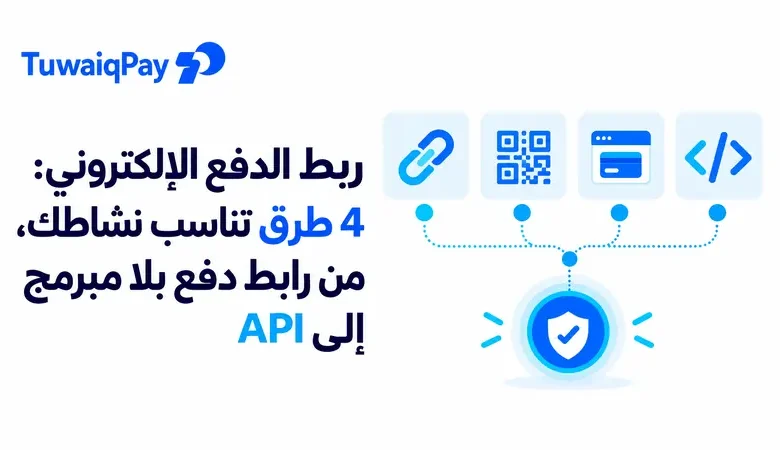
Payment integration means connecting your payment account to the place where your customers buy, so they can pay in one step and you receive the money and the result of every transaction without manual follow-up. Methods range from a payment link that a business owner creates from a phone with no developer, to a technical API connection for a store or a custom system. Tuwaiq Pay, a Saudi digital payment platform, offers all four methods in one account, with no setup fees and no monthly subscription. You can also visit the official Tuwaiq Pay website, contact the team on WhatsApp, or download the app from Google Play or the App Store.
Quick summary
- Invoice and payment link: the fastest method, and it needs no developer.
- QR code: best for shops, exhibitions, clinics and restaurants.
- Payment link on your website: suits a website without a shopping cart.
- API integration: best for a store or system that must update orders automatically, and it needs a developer.
What is payment integration?
Payment integration is the link between your collection account and the sales channel your customer uses: a chat, a shop, a website or a store. After the connection, the customer moves from deciding to buy to paying in a single step, and you receive a notification with the result. It does not necessarily mean programming, because many businesses start without code, and one account gathers all orders in a single report. For the payment methods customers use, see our guide to electronic payment methods in Saudi Arabia (Arabic).
Which payment integration method fits your business?
| Method | Best for | Developer needed? |
|---|---|---|
| Invoice and payment link | Selling through chats, services, freelancers | No |
| QR code | Shops, exhibitions, clinics, restaurants | No |
| Payment link on a website | A services website or company without a cart | No |
| API integration | A store or a custom order system | Yes |
Method 1: How do you connect payments with an invoice and a link?
You create an invoice in the Tuwaiq Pay app and send its link by WhatsApp, text message or email. The customer opens the link and pays with mada, Apple Pay or a card, and you receive real-time notifications and reports. This suits freelancers, home-based businesses and anyone who takes orders in chats, and you never scroll through old conversations to confirm a payment. The steps are in our guide to creating a payment link (Arabic).
Method 2: How do you use a QR code?
The business creates a QR code linked to the invoice, and the customer scans it with a phone and pays without a separate device. It works well in a shop, at an exhibition, in a clinic or in a restaurant, because payment happens in front of the customer. See our QR payment guide (Arabic) for more.
Method 3: How do you add payment to a website without a cart?
If you run a services website, a company site or a charity site with no shopping cart, you can place the payment link behind a button on the page. The customer opens the payment page and completes the transaction. This suits services with fixed prices and bookings. For a broader guide to connecting websites, read payment gateway for connecting websites (Arabic).
Method 4: When do you need an API integration?
A store that receives hundreds of orders needs a technical connection, so the customer pays inside the store and the order and stock update automatically. For this purpose Tuwaiq Pay provides an API, a sandbox test environment and webhooks that tell your system the result of each payment. This method requires a developer. If your store runs on a ready-made platform, ask the Tuwaiq Pay team which connection method is available for your platform. See the API guide (Arabic) and the testing guide (Arabic).
How do you choose the right payment integration?
Ask three questions. Where do my customers buy today? How many transactions do I receive in a day? Does my system need to react automatically after payment? Chats and few orders need a payment link, a shop needs a QR code, a website without a cart needs a link behind a button, and a store with many orders needs an API. You can combine them in one account, as described in our unified payment gateway article (Arabic).
What should you check before launching payment integration?
Review these items before you announce payment to your customers:
- Pay yourself with mada, Apple Pay and a credit card.
- Confirm that the notification arrives and the transaction appears in the report.
- Try a full refund and a partial refund.
- Test payment from your mobile phone, not only from a computer.
How long does payment integration take?
Tuwaiq Pay states that an account is activated within 24 hours after the requirements are complete, and then you can send a payment link or create a QR code. The technical connection depends on your store and your developer, and it is a stage separate from account activation.
How much does payment integration cost?
Fees apply only to successful transactions, and there are no setup fees, subscriptions or hidden fees. According to the prices published on the official website, fees inside Saudi Arabia before VAT are 1% + 1 SAR for a payment link and 1.2% + 1 SAR for an online store.
How do you start with Tuwaiq Pay?
Download the app and create your account. Prepare your commercial register or freelance document, national ID, national address and a bank letter. Once complete, the account is activated within 24 hours. Start with the method that covers most of your collections today.
Frequently asked questions
What is payment integration?
It is connecting your collection account to your sales channel so the customer pays in one step and you receive the result of the transaction.
Does payment integration need a developer?
Not for a payment link or a QR code. A developer is needed for an API integration in a store.
Can I combine more than one method?
Yes. Many businesses combine a payment link, a QR code and an API integration in one account.
Can a payment be refunded?
Yes, fully or partially.
Conclusion
Choosing a payment integration starts with your sales channel and your order volume, not with technology: a link for chats, a QR code for a shop, a button for a website and an API for a store. Start with the simplest method that covers your need, then add more from the same account. Prices and details may change, so refer to the official source or the Tuwaiq Pay team. You can also visit the official Tuwaiq Pay website, contact the team on WhatsApp, or download the app from Google Play or the App Store.



